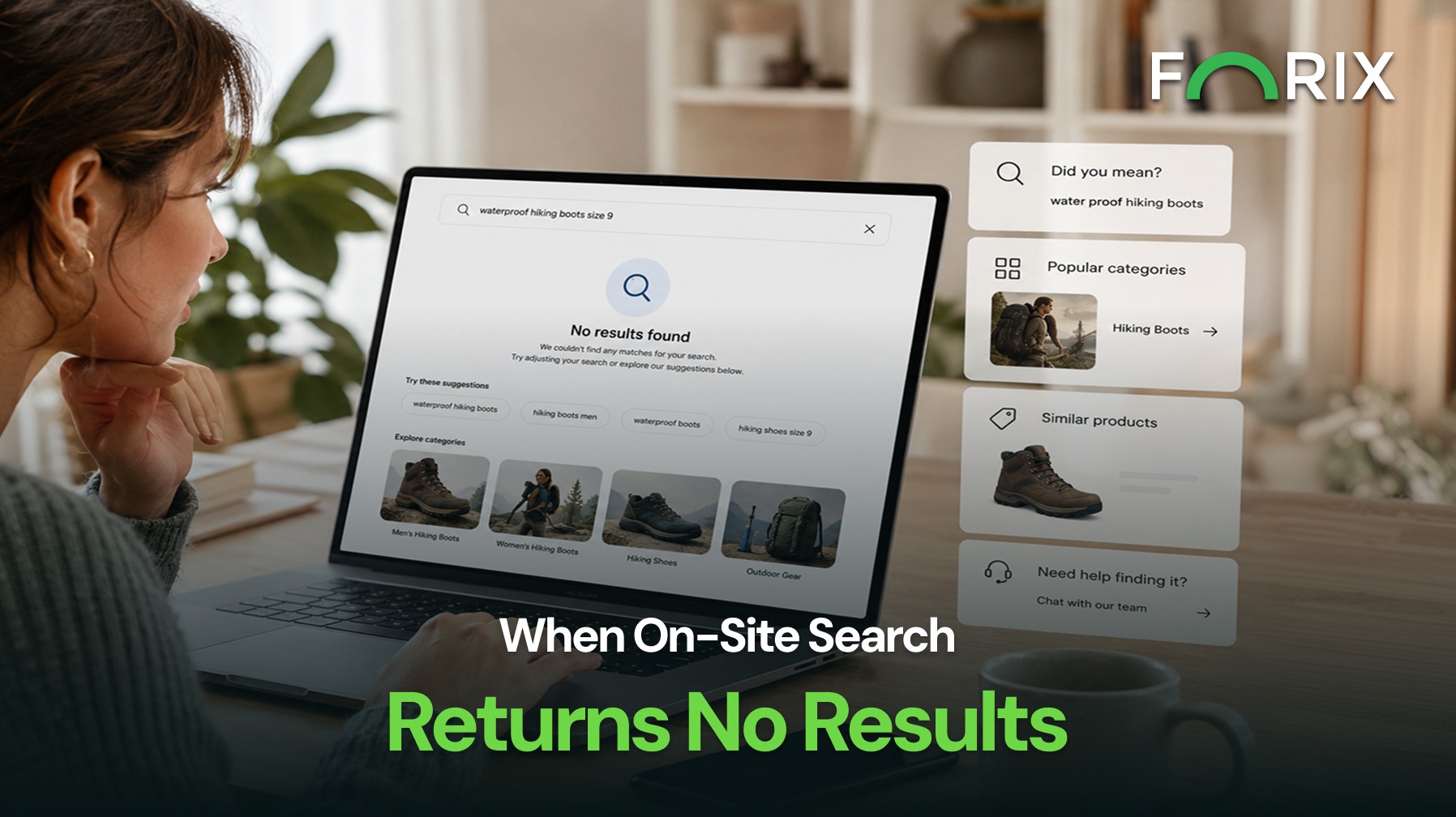
On-site search often serves shoppers who already know what they want. When a query returns no results, that high-intent journey can quickly stop.
A good zero-results page should help shoppers recover. It should explain what happened and give them another way to find relevant products.
For BigCommerce merchants, the issue can also go beyond page design. Product data and search settings may affect whether the right products appear at all.
Explore how Forix’s Design and Strategy services help eCommerce retailers improve search journeys and create clearer paths to product discovery.
Why Zero-Results Searches Matter
A shopper who uses search is trying to reach a specific product or category. Therefore, a failed search can interrupt an important part of the buying journey.
Common causes include:
Misspellings
Missing synonyms
Unfamiliar product terms
Missing search keywords
Incomplete product data
Model-number differences
Unavailable products
Search settings
However, shoppers rarely know why the search failed. They may simply assume the store does not carry what they need.
A clear recovery path gives them another option.
Understand What BigCommerce Search Can Find
Before redesigning the empty page, review the data behind search.
BigCommerce search can use product names, descriptions, and search keywords. Therefore, better product data can make products easier to find.
For example, shoppers may use a short term while the catalog uses a technical name. The correct product may exist, but search may still fail to show it.
Compare the words shoppers use with the terms in the catalog. This can reveal gaps that page design alone cannot fix.
Give Shoppers a Clear Recovery Path
First, explain the result in simple language.
Avoid technical messages such as “No records found.” Instead, tell shoppers that no exact match was found and offer useful next steps.
They may be able to:
Check the spelling
Try fewer words
Remove extra model details
Search by product type
Try a related term
Browse a relevant category
Also, keep the original query visible and editable. Shoppers should not have to start over.
Show Relevant Alternatives
Next, offer options that match the shopper’s intent.
An empty search page should not become a generic bestseller page.
In a BigCommerce store, useful options may include:
Related categories
Relevant brands
Similar products
Compatible products
Recently viewed items
Helpful content
Customer support
For example, a shopper may search for an old product model. In that case, a replacement product is more useful than an unrelated bestseller.
The goal is to help the shopper continue from the original search.
Improve the Product Data Behind Search
A better zero-results page can help shoppers recover. However, repeated failures may point to a deeper product-data issue.
Review:
Product names
Descriptions
Search keywords
SKUs
Brand names
Categories
Product attributes
Abbreviations
Model numbers
Common customer terms
BigCommerce product search keywords can help connect shopper language with relevant products.
For example, shoppers may use an industry abbreviation while the catalog uses a longer name. Adding common customer terms can make the product easier to find.
As a result, zero-results data should also support regular catalog updates.
Account for the Search Technology in Use
Not every BigCommerce store uses the same search setup.
Some merchants use native search. Others use search tools with features such as autocomplete, synonyms, filters, merchandising, or recommendations.
Before designing the recovery page, check what the active search tool can do.
Review whether it can:
Correct common misspellings
Recognize synonyms
Suggest related queries
Show useful categories
Recommend relevant products
Then design the recovery experience around those features.
Otherwise, the page may offer options that the search tool cannot support.
Make Mobile Recovery Easy
Mobile shoppers have less screen space. They may also make more typing errors.
As a result, recovery should require as little effort as possible.
Keep the search field easy to reach. In addition, make suggestions clear and easy to tap.
Product and category cards should use simple labels. Support should remain available, but it should not distract from the main recovery options.
Measure What Happens Next
A failed search is useful data.
Do not only count zero-results queries. Also review what shoppers do next.
Track:
Failed queries
Revised searches
Suggestion clicks
Category visits
Product views
Support contacts
Exits
Add-to-cart activity
Purchases
These patterns can reveal problems with both UX and product data.
For example, a common failed term may show that a synonym is missing. Repeated model searches may point to weak or inconsistent product information.
In addition, searches for products the store does not carry may reveal unmet demand.
For BigCommerce retailers, this data can guide search updates, catalog work, and merchandising decisions.
Use Search Data to Improve Merchandising
Failed searches can show a gap between how a store organizes products and how customers think about them.
Those insights may improve:
Search keywords
Product names
Categories
Filters
Product descriptions
Compatibility content
Merchandising
Inventory decisions
Therefore, the solution may go beyond the zero-results page.
Search data can help retailers improve the full product discovery journey.
Conclusion
A zero-results search should guide shoppers forward, not end the journey.
Clear messages, editable queries, useful alternatives, and better product data can help shoppers recover. Search data can also reveal gaps in product terms, catalog content, and search settings.
Forix helps BigCommerce retailers find search friction and create clearer paths from high-intent searches to relevant products and categories.
Common causes include misspellings, missing synonyms, unfamiliar terms, incomplete product data, model-number differences, unavailable products, or search settings.
What should a zero-results page include?
It should explain what happened, keep the original query editable, suggest useful changes, and offer relevant products, categories, content, or support.
Can product data affect storefront search?
Yes. Product names, descriptions, keywords, SKUs, attributes, and common customer terms can affect how easily shoppers find products.
Should zero-results pages show bestsellers?
Only when those products match the shopper’s intent. Related categories, substitutes, compatible products, or search suggestions are often more useful.
How should zero-results search performance be measured?
Review failed queries and what shoppers do afterward. Useful signals include revised searches, clicks, product views, exits, support contacts, add-to-cart activity, and purchases.
From flat sales to explosive sales growth - here's what happens when you partner with Forix
Partnering with Forix was hands down the best decision I’ve made for my store. The
redesign completely
transformed my site — it looks like a million dollars, yet I paid only a fraction of
what I expected.
Even better, sales started climbing almost immediately. Their process was simple,
transparent, and
focused on results. I only wish I had done it sooner.
Sarah Mitchell,Owner
“The free website report from Forix opened our eyes to issues we didn’t even know were costing us sales. The recommendations were clear, actionable, and backed by data. After implementing just a few of their suggestions, we saw a noticeable lift in conversions within weeks. Forix didn’t just give us a report—they gave us a roadmap to growth.”
Lena Hoffman, Director of eCommerce
“The redesign was exactly what my business needed. Clean, mobile-friendly, and conversion-focused. Sales are up 35% since launch.”
Ethan Carter, Founder
“Forix made our Magento to Shopify migration completely stress-free. Every product, customer record, and integration was moved accurately, and the new store’s design is sleek and user-friendly. Our team can now focus on growing sales instead of worrying about technical issues.”
Emily Rivera, Head of Digital Operations
198%
Conversion increase
32%
Transaction increase
30%
Time on site increase
28%
Conversion increase
92%
Revenue increase
87%
Engagement increase
Ready to See the Difference?
Your next big sales boost could start with our free website report. Let us show you the
untapped
potential in your store.
Complete the form below and our team will reach out to get started.
Thank you!
We’ve received your request for a free website report. Our team will be in touch shortly to gather a few details so we can begin your site analysis.
Click Here To
Get My Free Website Report Now
Claim Your FREE Webpage Design and Sell More ASAP
Complete the form below and our team will reach out to get started.
Thank you!
We’ve received your request for a free webpage design. Our team will be in touch shortly to gather a few details so we can begin your page redesign.
Click Here To
Get My Free Webpage Design Now
Claim Your FREE Migration Assessment and Sell More ASAP
Complete the form below and our team will reach out to get started.
Thank you!
We’ve received your request for a free Magento-to-Shopify migration assessment. Our team will be in touch shortly to gather a few details so we can begin building your comprehensive migration plan.
Click Here To
Get My Free Migration Assessment Now
Claim Your FREE Site Report and Sell More ASAP (a $2,000 value).
Complete the form below and our team will reach out to get started.
Thank you!
We’ve received your request for a free website report. Our team will be in touch shortly to gather a few details so we can begin your site analysis.