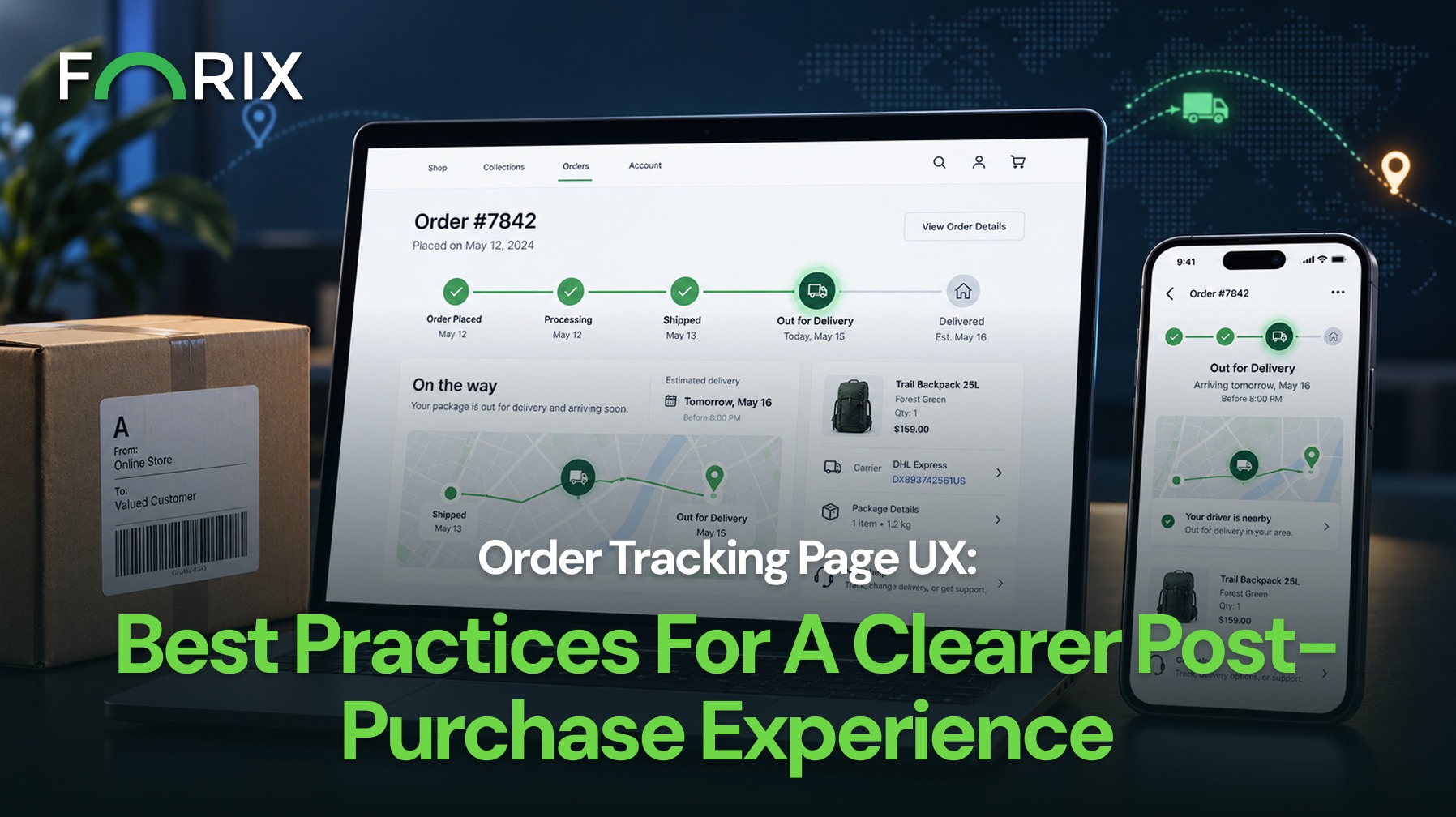
After checkout, customers still need clear answers about their order. They want to know whether it was confirmed, when it will ship, when it may arrive, and what to do if something changes.
For Shopify retailers, clear order tracking can reduce uncertainty after checkout. It can also help customers find answers without contacting support.
Order tracking is one of the few post-purchase pages customers may visit more than once. Each visit should answer the main question first.
A useful page should help customers understand:
Whether the order was confirmed
Whether it is processing or has shipped
When it is expected to arrive
Which products are included
Whether there are multiple shipments
Where to get help
For Shopify stores, these details should be easy to find. Customers should not need to search through several messages or pages.
Make the Current Order Status Obvious
First, make the current order status easy to see.
Use clear labels such as “Order confirmed,” “Preparing your order,” “Shipped,” and “Delivered.” Avoid internal terms that customers may not know.
A simple progress bar can also help. It should show what is complete, what is happening now, and what comes next.
Keep the same status terms across Shopify order updates. This includes confirmation messages, shipping notices, and support replies. As a result, customers are less likely to see conflicting information.
Present Delivery Information With Context
A tracking number alone does not answer every question.
When possible, show the expected delivery date, shipping method, carrier, destination, latest update, and recent tracking activity.
For Shopify retailers, this information should appear before secondary content. Customers should not have to move between emails, external tools, and several pages to understand the order.
If the order has not shipped, explain what happens next. Also explain delays, backorders, split shipments, or failed delivery attempts. If there are multiple shipments, label each one clearly and show its status.
Design for Mobile Tracking
Many customers open shipping emails and text messages on their phones. Therefore, the tracking page should work well on a small screen.
Place the current status, delivery date, and main tracking action near the top. Use short labels, readable text, clear spacing, and buttons that are easy to tap.
On mobile, keep the same content order as desktop. The latest update should remain easy to find.
Expandable sections can hold extra details without making the page feel crowded. In addition, keep the main tracking action visible so customers can move forward without searching.
Give Customers a Clear Support Path
Even a good tracking page cannot solve every issue.
Place support options near delays, failed deliveries, and order details. These options may include live chat, a contact form, FAQs, or links to shipping and return policies.
For Shopify retailers, support should stay connected to the order. When possible, include the order number automatically. Customers should not need to enter the same details again.
Keep the Brand Experience Consistent
Customers should not feel as if they left the store and entered an unrelated system.
Use consistent colors, type, labels, and navigation. This helps the tracking page feel connected to the storefront.
For Shopify stores, that continuity can make the post-purchase journey easier to follow.
After the main order details, retailers can add product-care tips, account benefits, support resources, or a relevant recommendation. However, these items should stay secondary.
Measure the Post-Purchase Experience
Finally, review how customers use the tracking experience.
Useful signals include:
Visits to the order status page
Repeat visits per order
Tracking-related support requests
Clicks to support resources
Repeat purchases after delivery
Mobile usability issues
For Shopify teams, repeated support questions can add useful context. If customers keep asking about delivery dates, shipment status, or delays, the page may not be answering those questions clearly.
Conclusion
Order tracking page UX is part of the customer experience, not just an operational page.
Clear updates make the experience easier to follow. Customers also need realistic delivery dates, mobile-friendly design, and easy access to support.
Forix helps Shopify brands improve the experiences that shape customer confidence before, during, and after checkout.
An order tracking page lets customers review order status, shipment details, estimated delivery information, and tracking updates after completing a purchase.
Can Shopify retailers customize the order tracking experience?
Yes. Available customization options depend on the storefront setup, customer account experience, applications, theme configuration, and other systems supporting order tracking.
What information should an order tracking page display?
It should prioritize current order status, expected delivery date, shipment progress, products ordered, delivery destination, tracking activity, and support options.
How can Shopify order tracking UX reduce customer service requests?
Clear status messages, delivery expectations, delay explanations, and support guidance can answer common questions before customers need to contact the retailer.
Should an order tracking page include product recommendations?
Recommendations can appear after essential order information. They should remain relevant and restrained so they do not distract customers from checking their shipment.
From flat sales to explosive sales growth - here's what happens when you partner with Forix
Partnering with Forix was hands down the best decision I’ve made for my store. The
redesign completely
transformed my site — it looks like a million dollars, yet I paid only a fraction of
what I expected.
Even better, sales started climbing almost immediately. Their process was simple,
transparent, and
focused on results. I only wish I had done it sooner.
Sarah Mitchell,Owner
“The free website report from Forix opened our eyes to issues we didn’t even know were costing us sales. The recommendations were clear, actionable, and backed by data. After implementing just a few of their suggestions, we saw a noticeable lift in conversions within weeks. Forix didn’t just give us a report—they gave us a roadmap to growth.”
Lena Hoffman, Director of eCommerce
“The redesign was exactly what my business needed. Clean, mobile-friendly, and conversion-focused. Sales are up 35% since launch.”
Ethan Carter, Founder
“Forix made our Magento to Shopify migration completely stress-free. Every product, customer record, and integration was moved accurately, and the new store’s design is sleek and user-friendly. Our team can now focus on growing sales instead of worrying about technical issues.”
Emily Rivera, Head of Digital Operations
198%
Conversion increase
32%
Transaction increase
30%
Time on site increase
28%
Conversion increase
92%
Revenue increase
87%
Engagement increase
Ready to See the Difference?
Your next big sales boost could start with our free website report. Let us show you the
untapped
potential in your store.
Complete the form below and our team will reach out to get started.
Thank you!
We’ve received your request for a free website report. Our team will be in touch shortly to gather a few details so we can begin your site analysis.
Click Here To
Get My Free Website Report Now
Claim Your FREE Webpage Design and Sell More ASAP
Complete the form below and our team will reach out to get started.
Thank you!
We’ve received your request for a free webpage design. Our team will be in touch shortly to gather a few details so we can begin your page redesign.
Click Here To
Get My Free Webpage Design Now
Claim Your FREE Migration Assessment and Sell More ASAP
Complete the form below and our team will reach out to get started.
Thank you!
We’ve received your request for a free Magento-to-Shopify migration assessment. Our team will be in touch shortly to gather a few details so we can begin building your comprehensive migration plan.
Click Here To
Get My Free Migration Assessment Now
Claim Your FREE Site Report and Sell More ASAP (a $2,000 value).
Complete the form below and our team will reach out to get started.
Thank you!
We’ve received your request for a free website report. Our team will be in touch shortly to gather a few details so we can begin your site analysis.